Drug Therapy Problem (DTP)
A Drug Therapy Problem (DTP) for a patient’s prescription in the Medication Record tab can be documented during a medication review in Patient Centre. The Follow-Up tab displays details for each drug that has been flagged as DTP in the Medication Record tab. All fields are mandatory. Once complete, the form will be read-only.
To document a DTP:
- In the medication review, select the Medication Record tab.
- Select the DTP checkbox for the prescription that requires a DTP.
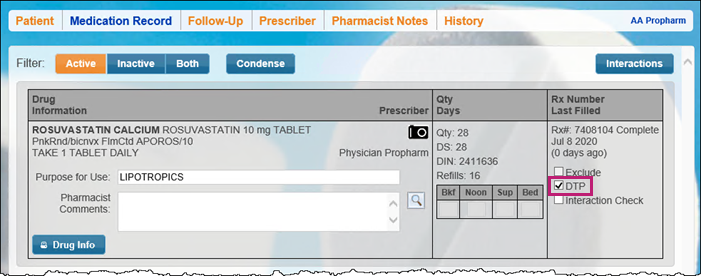
- Select the Follow-up tab to complete the documentation.
- Enter information into all of the field. All fields are mandatory.
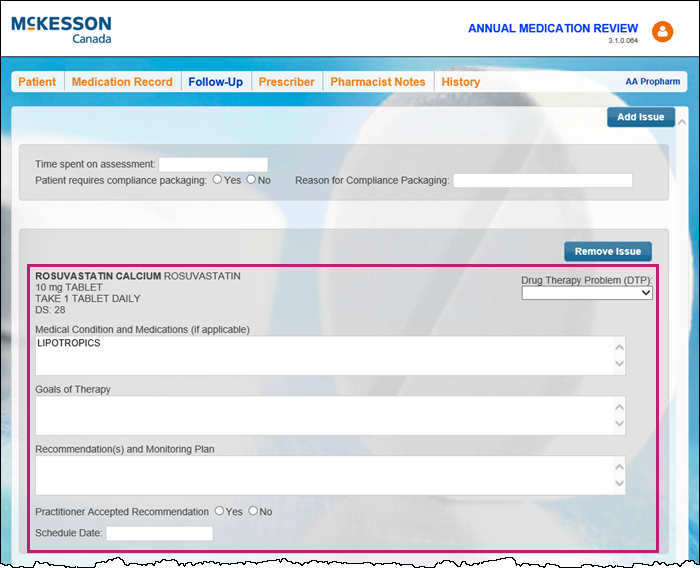
Note: If the follow-up is due to an issue outside of a DTP, it can be added as an issue rather than as a DTP. When the Add Issue button is selected, a text box will open to document the issue.
Once the medication review is finished and the Complete button is selected, an Activity for the DTP follow-up will be created in the Nexxsys Activities > To Do tab.